Most people who try a financial tracker app give up within a few weeks. The reason is usually boring: the app sees one bank, and your money lives in four. Salary lands in one place, savings sit in another, there's a dollar account for a rainy day, a Wise card for travel, a brokerage account, and maybe some crypto. Each of those apps shows you its own slice, and nobody shows you the total.
Capital Wizard was built for exactly that situation. It collects every account, currency, and investment in one place and gives you a single number you can trust.
What should a good financial tracker app do?
Before looking at any specific app, it helps to know what you're choosing between. If you have more than one bank, check for these:
- Every account in one view. Banks, cards, cash, brokerages, crypto wallets.
- Real multi-currency support. Balances in UAH, USD, and EUR converted at current rates, so the total means something.
- Statement import that works. Most banks let you download a CSV, XLS, or PDF. The app should read it, categorise transactions, and skip duplicates.
- Investments included. A portfolio that grew 8% changes your net worth as much as a salary does.
- Read-only access. A tracker needs to see your money. It never needs to move it.
- Your data is yours. Full export, no resale.
Plenty of budgeting apps handle the first point and stop there.
How Capital Wizard works
Connect or import your accounts
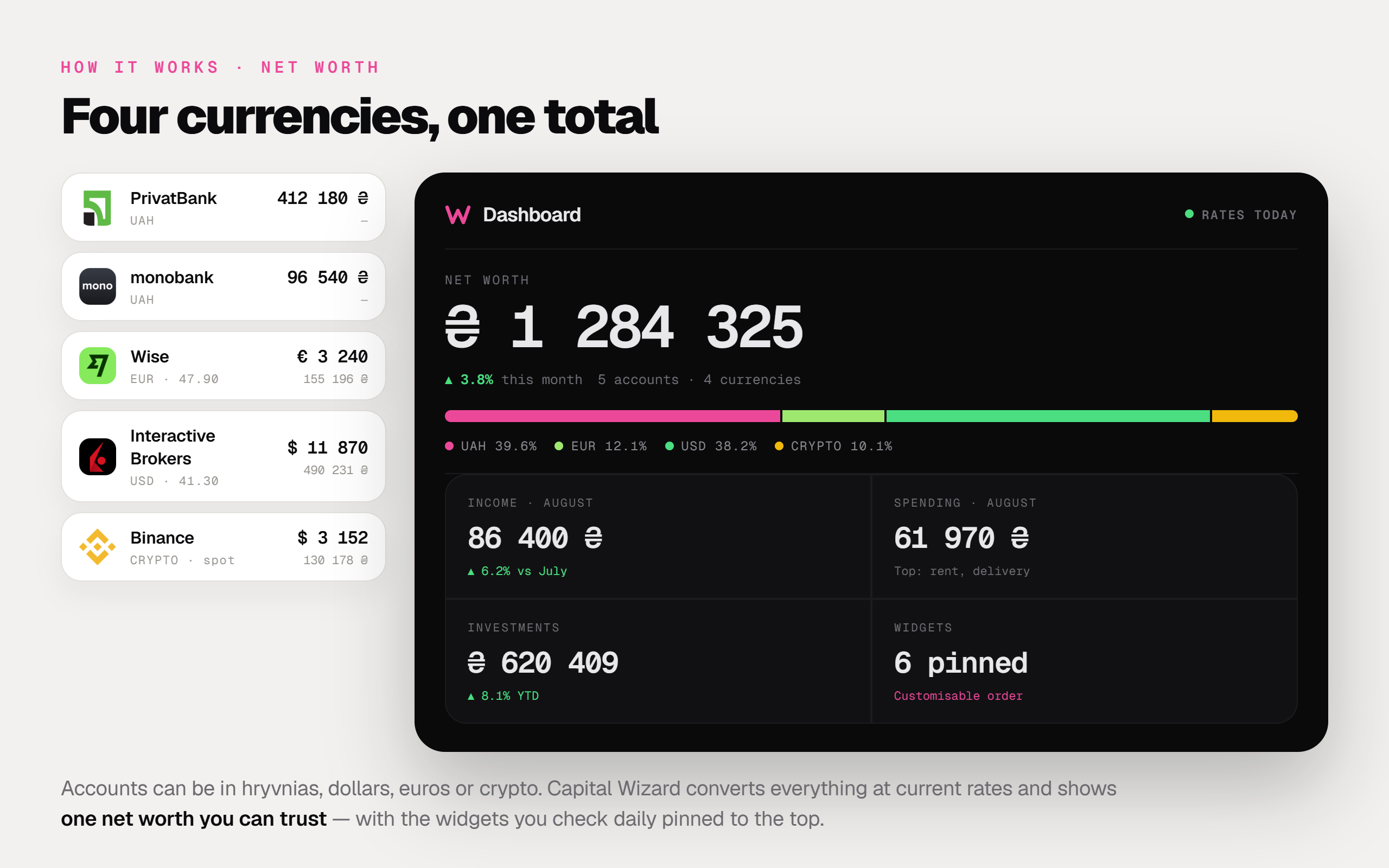
You can connect supported banks and brokerages or upload a statement from any bank that exports one in CSV, XLS, or PDF. Capital Wizard works with PrivatBank, monobank, Wise, Interactive Brokers, and Binance, among others. Imported transactions are categorised automatically, and duplicates are caught when statements overlap.
One net worth across currencies
Accounts can be in hryvnias, dollars, euros, or crypto. The app converts everything at current exchange rates, and the dashboard shows your total net worth. Widgets are customisable, so you can keep the numbers you check daily at the top.
Categories you control
Auto-categorisation handles most transactions. For the tricky ones, you can switch on "Always ask" for a specific counterparty. That's handy when the same person sends you both salary and a personal transfer, or when you move money between your own accounts and pay a bank fee on the way.
Investments next to everyday money
Brokerage accounts, ETFs, funds and crypto sit in the same app as your cards. You see how the portfolio actually performs and how it moves your overall capital, without a separate spreadsheet.
People and companies
Every transaction can be linked to a person or a company. Over time, this becomes a ledger: who owes you, whom you owe, how much went to a particular landlord, contractor, or food delivery service in a year.
Personal and business spaces
If you're a sole proprietor or run a small business, you can keep business books in a separate space. The money stays apart, and you still switch between spaces in one app.
Shared access with an audit trail
Invite a partner, an accountant, or a co-founder and set permissions per space. Access can be revoked at any time. Every edit and import is logged with the user and timestamp, so you always know who changed what.
Export everything
Your full history downloads as CSV or JSON whenever you want it.
Security
Data travels over TLS. Stored credentials and tokens are encrypted with AES-256. Imports are read-only, so Capital Wizard can't move money from your accounts. Your data is never sold or used to train models.
Pricing and platforms
The first month is free, and you don't need a card to start. After that, a personal space costs $5 a month. Each additional space is $2 a month, and each invited person is $1 a month.
Capital Wizard runs in the browser at app.capital-wizard.com and on iPhone through the App Store. The Android version is being prepared for launch. The interface is available in English and Ukrainian.
Who Capital Wizard suits
It fits you best if your money is spread across several banks, you hold savings in more than one currency, or you invest and want to see your portfolio next to everyday spending. Freelancers and business owners who need to separate personal and company money get the most out of spaces.
If you have a single card and only want to cap your coffee budget, your bank's built-in analytics will probably be enough.
Getting started
- Open app.capital-wizard.com or download the iOS app.
- Add your accounts: connect the supported ones and import statements for the rest.
- Check the categories on the first import and set "Always ask" where you need it.
- Look at your net worth. For many people, this is the first time they see the full number.
FAQ
What is a financial tracker app?
It's an app that collects your income, spending, balances, and investments so you can see where money comes from, where it goes, and how much you actually have.
Can I track multiple bank accounts in one app?
Yes. Capital Wizard combines accounts from different banks, brokerages, and crypto exchanges, either through a connection or by importing a statement.
Does Capital Wizard support different currencies?
Yes. UAH, USD, EUR, and crypto convert automatically at current rates, and your net worth appears as one total.
Is it safe to connect my bank?
Access is read-only, so the app can't move money. Data is sent over TLS, credentials are stored with AES-256 encryption, and we don't sell your data.
How much does it cost?
The first month is free without a card. Then $5 per month for a personal space, plus $2 for each extra space and $1 for each invited person.
Is there an Android app?
Android is being prepared for launch. Until then, the web version works in any mobile browser.
Try Capital Wizard free for a month → app.capital-wizard.com
See your own number instead of reading about someone else’s.
Import a statement, add your accounts, and get a real net-worth figure in an evening. One month free, no card required.
Start free